Use Case 40
Promote franchise opportunities
Available steps and preparation
This video explains the controls available today and how to prepare. Some actions depend on permissions, approval or tools that are still coming soon; the guide identifies these steps.
Browse use cases for FranchiseStep-by-step guide
The same walkthrough in writing, with a screenshot for every step.
Preparation guide: the related platform tools are shown; this does not demonstrate a completed dedicated workflow. Check the limitations below.
1. Choose the available listing route
Preparation only. Open the AI listing agent business route. Only Business editing is available; dedicated franchise/property/capital editors are disabled.
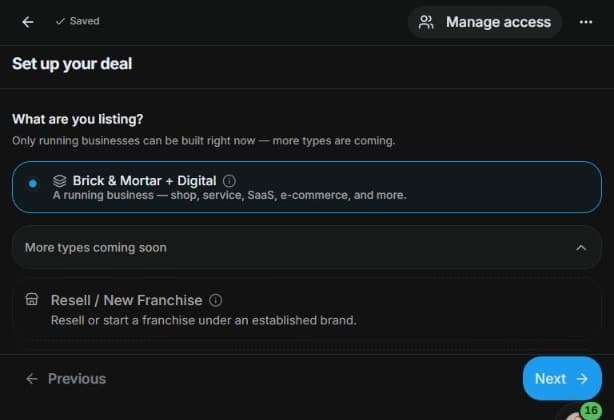
2. Inspect general document preparation
Inspect Document Builder → Create → Standalone document. Use general templates only where appropriate. This does not enable the disabled dedicated editor or publish an opportunity.
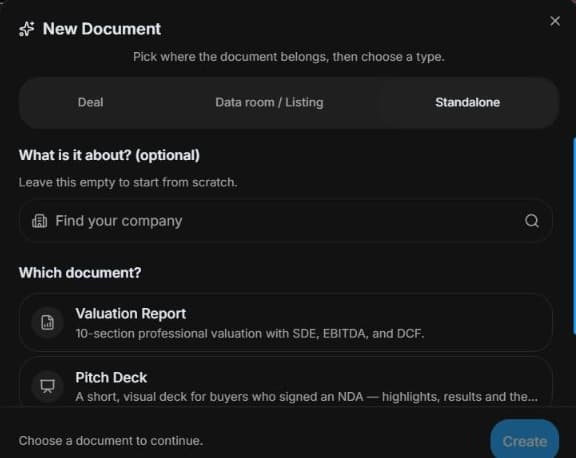
3. Prepare controlled source evidence
Inspect Create data room → Standalone room if permitted. Prepare known facts and controlled evidence. It does not create a specialised application or property deal.
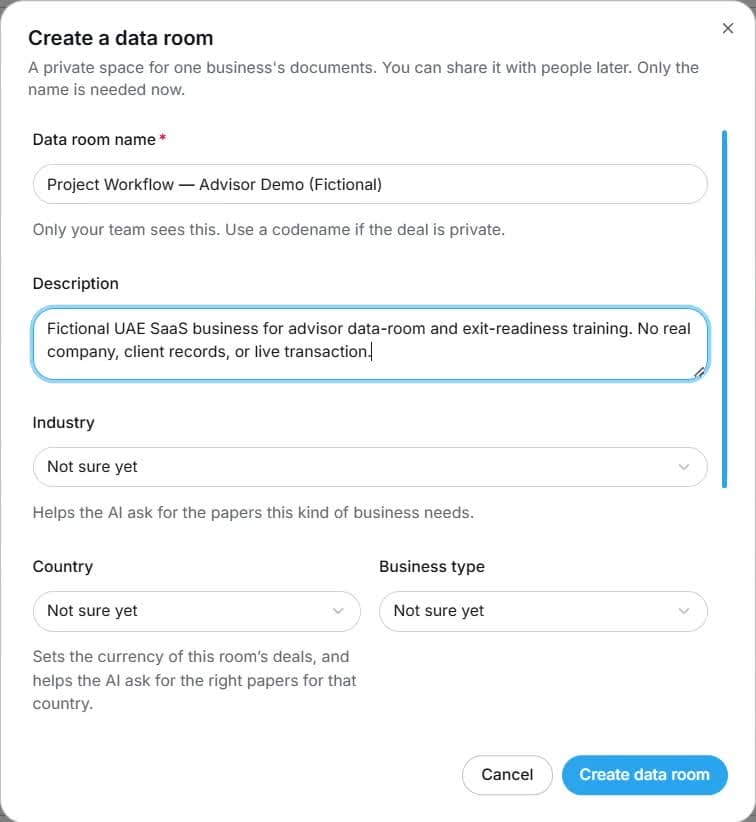
4. Review the outcome and next step
Review investment assumptions and appropriate disclosures with the responsible professional, then organise permitted evidence. The outcome is a reliable pack for real recruitment conversations. Wait for the dedicated editor or follow your established authorised publication process. Do not describe preparation as a published franchise opportunity or interpret a document template as legal disclosure compliance.
Common questions
Short answers to what people ask most about this part of the product.
Why can’t I select Franchise to publish?
The dedicated editor is disabled. Use preparation tools without disguising the franchise opportunity as a Business sale.
Can document templates enable franchise publishing?
No. They are general preparation tools. The dedicated Franchise editor remains disabled; review the pack and use only an established authorised publication process.
Why are the shown controls in English?
These real platform captures use English labels. Italian narration and instructions retain them so you can identify the exact shown controls.
Video transcript
You want an accurate franchise opportunity brief. This is preparation only: Franchise is disabled in the listing type selector. Do not select Business to bypass the restriction. Prepare brand facts, investment assumptions, location needs and authorised materials while dedicated franchise publishing is unavailable. The general tools shown organise a reviewable pack rather than a public franchise listing. Open Document Builder and inspect Standalone document choices. Valuation, pitch and confidential information memorandum are general templates, not the disabled dedicated publishing form. Choose a template only if it suits the project, and label source assumptions clearly. A template does not publish an opportunity or certify legal eligibility. Prepare a reviewed brief using authorised facts, including which claims need professional confirmation. If your role allows a preparation room, inspect Create data room and Standalone room. Give the project a clear name and use only known business details. The general room can organise evidence, but it is not a franchise application or property transaction engine. Review file version, classification and visibility before any real upload or invitation. Keep professional checks and specialised approvals in their proper process. Review investment assumptions and appropriate disclosures with the responsible professional, then organise permitted evidence. The outcome is a reliable pack for real recruitment conversations. Wait for the dedicated editor or follow your established authorised publication process. Do not describe preparation as a published franchise opportunity or interpret a document template as legal disclosure compliance.
Watch the video, or follow the written steps below. Both cover the same walkthrough.
Next guide