Use Case 42
Share franchise documents
Available steps and preparation
This video explains the controls available today and how to prepare. Some actions depend on permissions, approval or tools that are still coming soon; the guide identifies these steps.
Browse use cases for FranchiseStep-by-step guide
The same walkthrough in writing, with a screenshot for every step.
Preparation guide: the related platform tools are shown; this does not demonstrate a completed dedicated workflow. Check the limitations below.
1. Find the correct room
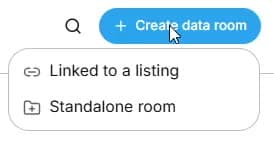
Preparation only. Use the correct existing listing room or inspect Create data room → Standalone room. New business listings prepare linked rooms automatically.
2. Check document version and visibility
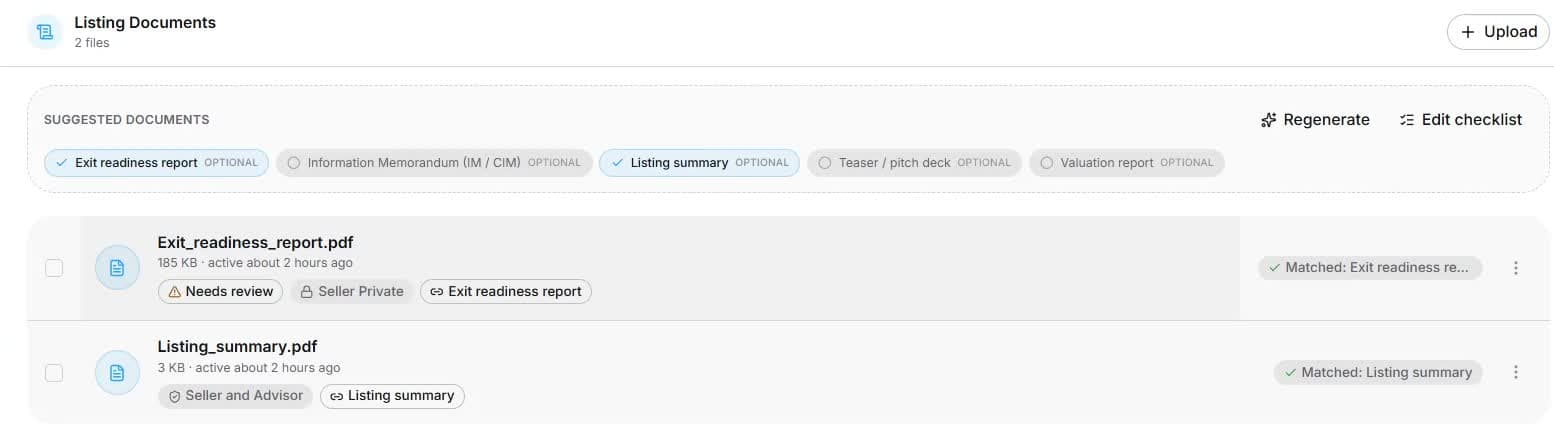
Open Documents and inspect category, review status, version and visibility. Organisers review upload classification; readers see only permitted files. Captured records are fictional.
3. Understand organiser access controls
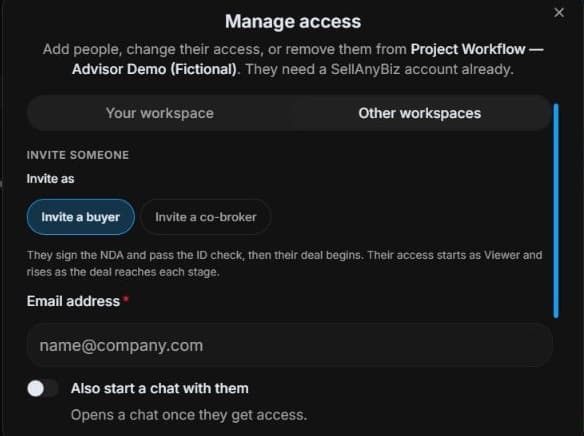
Organiser view: inspect Manage access → Invite buyer / Invite co-broker. Review side, NDA, identity and approval requirements. Reader access does not grant this panel. No invitation or approval is performed.
4. Review the outcome and next step
Check version, recipient and confidentiality requirements before real sharing. Keep drafts distinct from accepted agreements and protect restricted brand information. Your actual franchise process determines formal disclosures and approvals. The useful outcome is a correctly organised, permission-controlled preparation pack, with legal and recruitment decisions reviewed through their proper process rather than inferred from file storage.
Common questions
Short answers to what people ask most about this part of the product.
Does uploading an agreement approve the applicant?
No. It organises a file. Disclosure, approval and signing follow the authorised franchise process separately.
How do I distinguish draft and accepted agreements?
Check version, review status and permitted recipient before sharing. Storage or AI filing does not sign an agreement or satisfy formal franchise disclosure requirements.
Why are the shown controls in English?
These real platform captures use English labels. Italian narration and instructions retain them so you can identify the exact shown controls.
Video transcript
You need controlled review of brochures, training material and draft franchise agreements. This is preparation only: the dedicated franchise editor is disabled. A general room organises permitted evidence but neither delivers formal franchise disclosures nor approves an applicant. Define the intended recipient and which material they may review before uploading or sharing. In Documents, inspect file name, category, review status and visibility. These files belong to a fictional training room. A generated report is a summary to review, not a replacement for original accounts or signed contracts. Organisers can upload authorised evidence and inspect its classification. Readers should open only the files actually permitted for their role and verify current reporting periods before relying on them. The organiser’s Manage access panel separates workspace access from external buyer and co-broker invitations. Check the intended person and side before changes. An invitation is not unrestricted access: NDA, identity and approval requirements can still apply. Viewing a document does not give a reader these organiser controls. Check version, recipient and confidentiality requirements before real sharing. Keep drafts distinct from accepted agreements and protect restricted brand information. Your actual franchise process determines formal disclosures and approvals. The useful outcome is a correctly organised, permission-controlled preparation pack, with legal and recruitment decisions reviewed through their proper process rather than inferred from file storage.
Watch the video, or follow the written steps below. Both cover the same walkthrough.
Next guide