Use Case 45
Connect with investors and occupiers
Available steps and preparation
This video explains the controls available today and how to prepare. Some actions depend on permissions, approval or tools that are still coming soon; the guide identifies these steps.
Browse use cases for Commercial propertyStep-by-step guide
The same walkthrough in writing, with a screenshot for every step.
Preparation guide: the related platform tools are shown; this does not demonstrate a completed dedicated workflow. Check the limitations below.
1. Define the relevant person
Preparation only. Open Browse → People and define role, sector and geography before matching or contact.
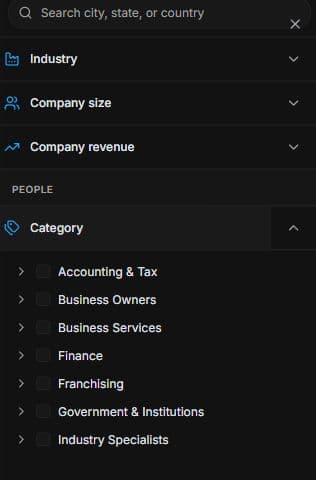
2. Define a relevant people search
Open Browse → People → Filters. Choose category, role, industry and location. Review each profile; category membership alone is not confirmed interest, authority or capacity.
3. Separate new matches from existing interest
Use Ask AI for new matching requests. Interested in your listing narrows existing savers/viewers. Review suggestions and use Save to a search where offered. No contact or campaign is sent.
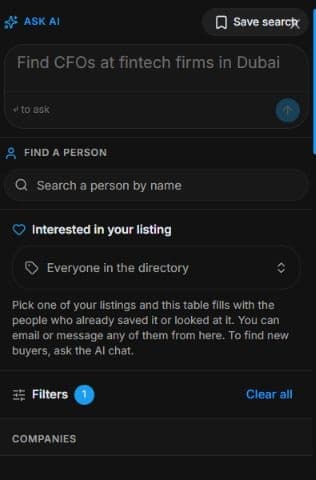
4. Review the outcome and next step
Confirm location needs, intended use and financial assumptions with the party before an offer discussion. Keep property evidence and restrictions clear when sharing. Use reviewed communication rather than assuming a match sends an introduction. The useful outcome is a qualified audience and next question; property offers and lease decisions follow their own authorised process.
Common questions
Short answers to what people ask most about this part of the product.
Are People results verified occupiers?
No. They are general research suggestions. Confirm actual requirements, authority and capacity separately.
What should I confirm with an occupier?
Confirm location, intended use, timing and financial assumptions in an authorised conversation. General People results are not verified occupancy requirements or an accepted lease offer.
Why are the shown controls in English?
These real platform captures use English labels. Italian narration and instructions retain them so you can identify the exact shown controls.
Video transcript
You want to research investors or business occupiers for a property project. This is preparation only because the property editor is disabled. General People filters define a potential audience, not verified occupancy requirements or investment capacity. Translate the project into role and geography criteria, then identify what must be confirmed in a real discussion. In People, open Filters and choose a relevant category before refining the criteria. Translate the requirement into role, industry and location. Check the profile rather than assuming every result has the required budget, experience or authority. A category describes a person’s role; it does not prove their current interest in this particular opportunity or their ability to complete a transaction. Use Ask AI to describe the people you need and why they would fit. Interested in your listing filters people who already saved or viewed the listing; it does not find new buyers. For new matches use the People Agent conversation, then inspect the suggestions. Save relevant results to a search where offered. Matching does not send messages or grant confidential document access. Confirm location needs, intended use and financial assumptions with the party before an offer discussion. Keep property evidence and restrictions clear when sharing. Use reviewed communication rather than assuming a match sends an introduction. The useful outcome is a qualified audience and next question; property offers and lease decisions follow their own authorised process.
Watch the video, or follow the written steps below. Both cover the same walkthrough.
Next guide