Use Case 28
Discover acquisition opportunities
Platform walkthrough
Learn from the actual platform screens and written steps, then perform the authorized actions in your own workspace. Actions explained in the video are not necessarily completed in the example.
Browse use cases for Investor / PEStep-by-step guide
The same walkthrough in writing, with a screenshot for every step.
This walkthrough uses actual platform screens. Actions requiring an authorized user are explained for you to perform in your workspace.
1. Start with the acquisition brief
Open Browse → Listings. Define sector, country and investment limits before shortlisting.
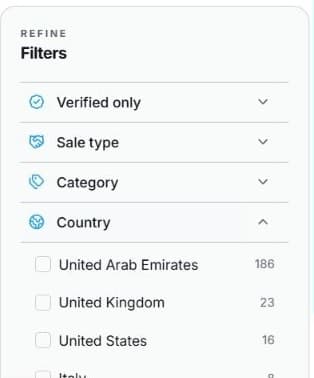
2. Set location and investment criteria
Open Browse → Listings → Filters. Set country, industry and investment range; check currency. Adjust one criterion at a time. Asking price is separate from purchase costs and valuation.
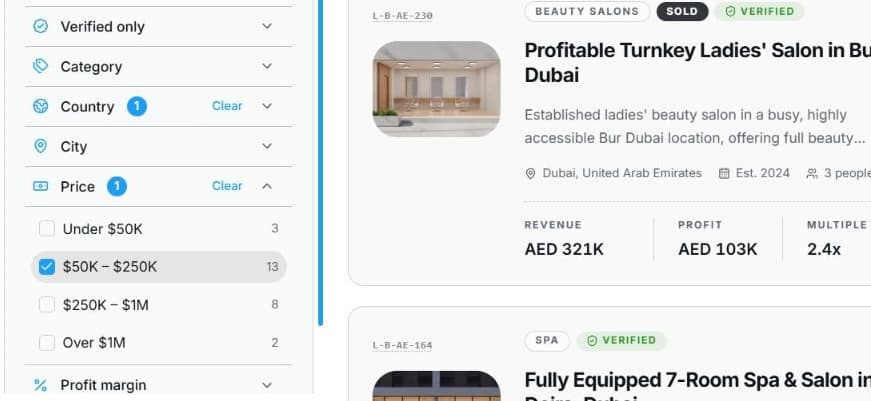
3. Compare and shortlist
Choose Sort, inspect Listing detail and use the save heart. Best for you needs profile context and no typed search. Compare public evidence before seeking confidential access.
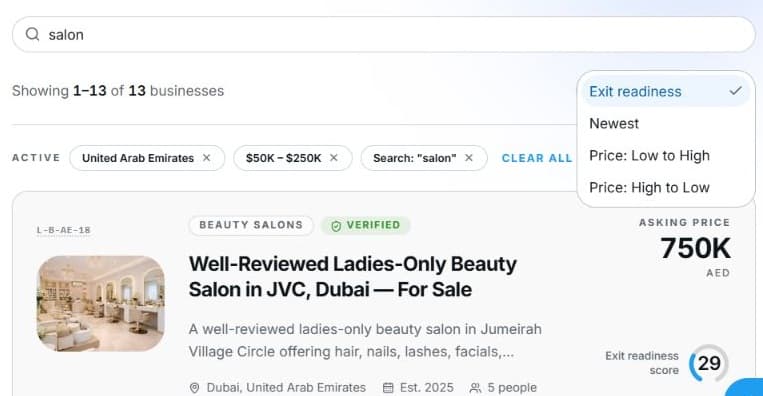
4. Review the outcome and next step
For each candidate, record the material unknowns for analyst review, such as reporting period, dependencies and price assumptions. Seek confidential access through the listing’s displayed route when appropriate. A saved listing is a research lead, not approved investment. Your team’s decision should use verified sources and its own review requirements before starting the real transaction.

Common questions
Short answers to what people ask most about this part of the product.
Is a listed business investment-approved?
No. The listing supplies disclosed facts; verify source evidence, thesis fit and your team’s approval process separately.
What should analysts check before confidential access?
Compare sector, geography, price assumptions and reporting periods with the thesis. Save a research shortlist and identify the missing evidence before a permitted access request.
Why are the shown controls in English?
These real platform captures use English labels. Italian narration and instructions retain them so you can identify the exact shown controls.
Video transcript
Your team seeks an acquisition aligned with its sector and geography mandate. Start in Browse and Listings with a defined investment range. Use public evidence to build an initial shortlist before seeking confidential records. Compare candidates with the investment thesis rather than interpreting a match as an automatic recommendation or committee decision. Open Listings and refine Filters for country, industry and the investment range you can realistically consider. Check currency before comparing amounts. Begin with essential criteria and loosen one filter at a time if results are sparse. An asking price is the seller’s indication, not the final purchase cost or an independently verified valuation. Allow for your separate acquisition and review requirements. Use Sort, then open a listing for its public details. Best for you needs sufficient profile context and no typed search, so another ordering may be more appropriate. Compare business model, location and disclosed figures, then use the save heart for a shortlist. Saving helps you revisit a record; it neither reserves the business nor requests confidential documents or starts a signed transaction. For each candidate, record the material unknowns for analyst review, such as reporting period, dependencies and price assumptions. Seek confidential access through the listing’s displayed route when appropriate. A saved listing is a research lead, not approved investment. Your team’s decision should use verified sources and its own review requirements before starting the real transaction.
Watch the video, or follow the written steps below. Both cover the same walkthrough.
Next guide