Use Case 29
Source off-market deals
Platform walkthrough
Learn from the actual platform screens and written steps, then perform the authorized actions in your own workspace. Actions explained in the video are not necessarily completed in the example.
Browse use cases for Investor / PEStep-by-step guide
The same walkthrough in writing, with a screenshot for every step.
This walkthrough uses actual platform screens. Actions requiring an authorized user are explained for you to perform in your workspace.
1. Define the research question
Open Browse → Companies. Distinguish company research from a confirmed transaction or verified credit file.
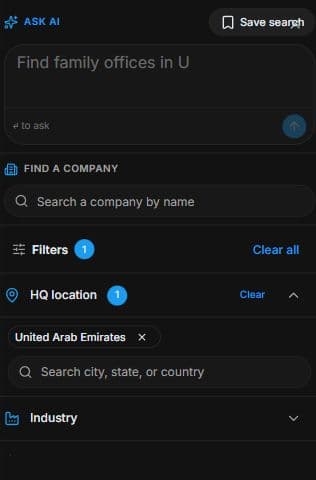
2. Narrow the company list
Open Browse → Companies → Filters. Set industry, country and relevant characteristics. Inspect Profile and confirm material facts against authorised current evidence.
3. Interpret signals as research leads
Inspect Signals → Buying / Selling / Neutral. Distinguish signals from confirmed intent and capacity. Revisit criteria through Saved searches where available. No contact is sent.
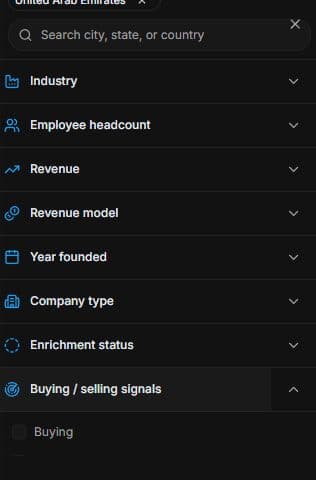
4. Review the outcome and next step
Qualify the company and decide whether an authorised conversation is appropriate. Confirm the owner’s interest before describing a target as available. If preparing outreach, review audience, exclusions, wording and costs before launch. The useful outcome is a researched, qualified target and a clear next question, not a presumed off-market transaction or automatic introduction.
Common questions
Short answers to what people ask most about this part of the product.
Does Selling prove an off-market deal?
No. It is a research signal. Confirm the company’s current situation and the owner’s authorised interest.
When can I call a target available?
Only after the company’s situation and the owner’s authorised interest are confirmed. A profile or Selling signal alone is research, not a sale instruction.
Why are the shown controls in English?
These real platform captures use English labels. Italian narration and instructions retain them so you can identify the exact shown controls.
Video transcript
You want to research potential acquisition targets without a public sale listing. Open Browse and Companies with a narrow sector and geography. This is company research, not confirmation of off-market availability. Begin with characteristics that match the thesis and separate a data signal from an owner’s expressed willingness to discuss selling. Open Companies and use Filters for industry, country and relevant company characteristics. Keep the criteria close to the actual project rather than selecting every possible sector. Open a profile and compare available facts with your brief. Missing or old information needs confirmation from a current authorised source. A research profile is not automatically a complete financial, ownership or credit record. Open Signals and inspect Buying, Selling and Neutral. Treat them as research leads requiring context. Selling does not establish that the owner has agreed to sell; Buying does not prove financing capacity. Identify the next fact to verify and save a useful search where offered. Contact or transaction work must follow a separate reviewed process, not an assumption based on a signal. Qualify the company and decide whether an authorised conversation is appropriate. Confirm the owner’s interest before describing a target as available. If preparing outreach, review audience, exclusions, wording and costs before launch. The useful outcome is a researched, qualified target and a clear next question, not a presumed off-market transaction or automatic introduction.
Watch the video, or follow the written steps below. Both cover the same walkthrough.
Next guide