Use Case 25
Prepare valuation and deal documents
Platform walkthrough
Learn from the actual platform screens and written steps, then perform the authorized actions in your own workspace. Actions explained in the video are not necessarily completed in the example.
Browse use cases for M&A advisorStep-by-step guide
The same walkthrough in writing, with a screenshot for every step.
This walkthrough uses actual platform screens. Actions requiring an authorized user are explained for you to perform in your workspace.
1. Match source and purpose
Open Document Builder → Create. Decide listing, deal or standalone source before selecting a template.
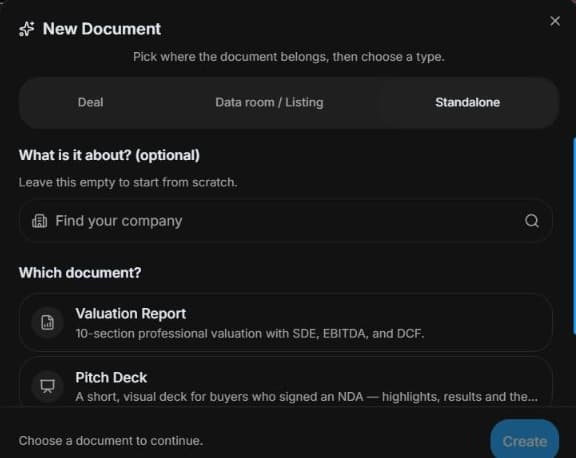
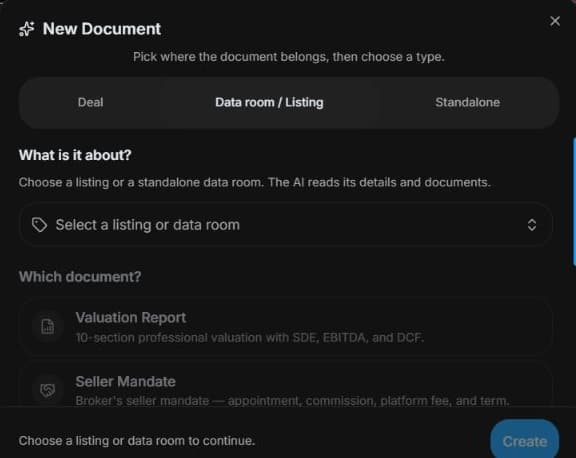
2. Select the source before the template
Open AI Builder → Document Builder → Create. Select listing, deal or standalone source and inspect its available templates. Use authorised evidence and identify unknown assumptions.
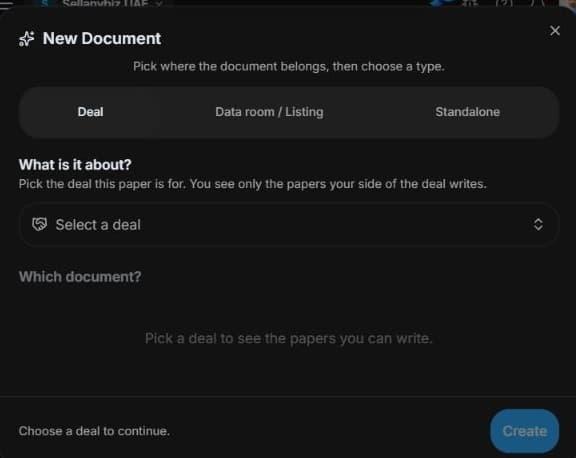
3. Check deal eligibility and review the draft
Choose an eligible Deal before the deal-bound template. Missing choices may reflect role/stage restrictions. Review any generated draft. No document is generated, sent or signed here.
4. Review the outcome and next step
Review material assumptions against current sources and the appropriate professional judgement. Exit readiness measures different things from valuation. Check the client’s confidentiality restrictions before any sharing. The safe walkthrough generates no report, signs no instrument and sends no document; your actual draft and any opinion still require source verification and review.
Common questions
Short answers to what people ask most about this part of the product.
Is readiness the same as valuation?
No. Readiness measures preparation/gaps. Valuation uses separate financial assumptions and requires appropriate professional review.
Can I prepare a CIM without a deal?
Standalone document choices include valuation, pitch and CIM where available. Deal-bound NDA/LOI templates instead require an eligible deal, role and stage.
Why are the shown controls in English?
These real platform captures use English labels. Italian narration and instructions retain them so you can identify the exact shown controls.
Video transcript
You need a valuation draft or confidential information memorandum supported by reviewable evidence. Start in Document Builder and choose listing, deal or standalone source. Standalone supports valuation, pitch and CIM preparation, while transaction-bound documents require an eligible deal. Open Document Builder and Create. Choose a listing, a deal or a standalone source before the template. Listing choices include valuation, mandate, exit readiness, pitch, confidential information memorandum and summary; standalone choices are narrower. Select a document appropriate to the actual question and provide authorised evidence. Do not invent missing figures or assume every template works without an eligible listing or deal. For deal-bound documents, choose an eligible deal first. NDA, LOI and lender templates depend on the deal, role and stage. If the selection is empty, check the workspace and access rather than choosing an unrelated transaction. Review parties, dates, amounts, sources and clauses in a generated draft. Generation does not send, sign or legally approve the document; those actions require separate review and authority. Review material assumptions against current sources and the appropriate professional judgement. Exit readiness measures different things from valuation. Check the client’s confidentiality restrictions before any sharing.
Watch the video, or follow the written steps below. Both cover the same walkthrough.
Next guide