Use Case 19
Co-broker deals
Available steps and preparation
This video explains the controls available today and how to prepare. Some actions depend on permissions, approval or tools that are still coming soon; the guide identifies these steps.
Browse use cases for Business brokerStep-by-step guide
The same walkthrough in writing, with a screenshot for every step.
Preparation guide: the related platform tools are shown; this does not demonstrate a completed dedicated workflow. Check the limitations below.
1. Prepare brokerage cooperation
Preparation only. Read-only preparation. Open the separate Co-Brokerage NDA on the relevant listing. Do not sign or submit during exploration.
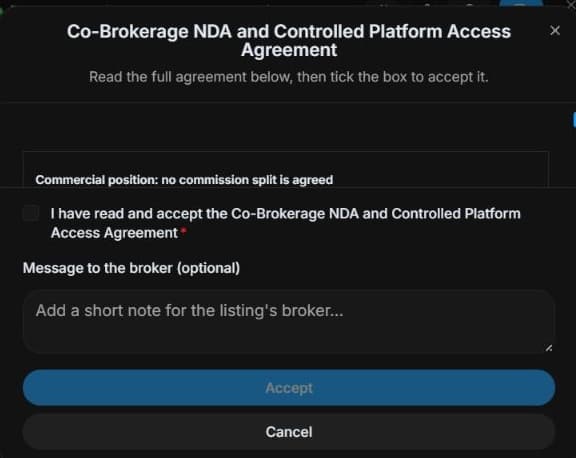
2. Read the separate co-broker agreement
Read Co-Brokerage NDA and Controlled Platform Access Agreement. Check parties, terms and authority. The checkbox selects acceptance in the form; final Accept submits the accepted agreement and co-broker request. An optional message explains the request. Here acceptance stays unchecked and nothing is submitted.
3. Understand listing-side review
Inspect Invite buyer / Invite co-broker. Written continuation: wait for listing-side review and confirm responsibilities and visibility. This panel does not negotiate commission splits or demonstrate approval.
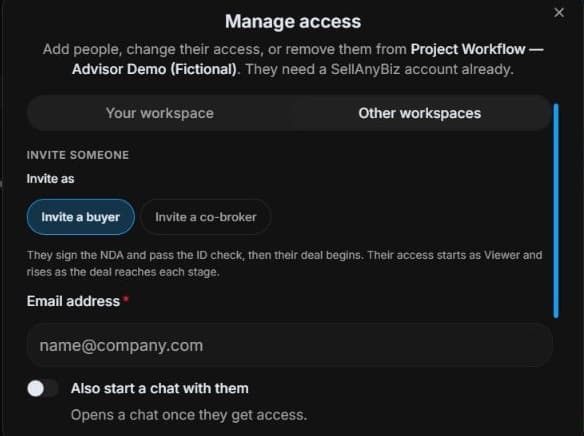
4. Review the outcome and next step
Agree cooperation scope with the listing broker and read offered terms before a real request. A room invitation proves no commission split. After listing-side approval, verify authorised deal and file access. This guide creates no acceptance, request or commission amendment; those actions need the responsible brokers’ review and appropriate authority.
Common questions
Short answers to what people ask most about this part of the product.
Is the buyer NDA enough for co-broker access?
No. The co-broker agreement and listing-side review are separate. Selecting the checkbox prepares acceptance in the form; the final Accept button submits the accepted agreement and real co-broker request. Neither action occurs in this example.
Does a room invitation set the commission split?
No. Review cooperation terms and responsibilities with the listing broker. Invite co-broker is an access role, not evidence of an agreed commission allocation.
Why are the shown controls in English?
These real platform captures use English labels. Italian narration and instructions retain them so you can identify the exact shown controls.
Video transcript
Another broker may help with a listing, but cooperation requires reviewed terms and permitted visibility. This is read-only preparation. Open the actual Co-Brokerage NDA and Controlled Platform Access Agreement, separate from the buyer agreement. Understand the request before making a legally meaningful acceptance; the tutorial leaves acceptance unchecked and submits no request. Read the Co-Brokerage NDA and Controlled Platform Access Agreement in full. Confirm the parties, confidentiality terms and your authority. The checkbox selects acceptance in this form. The final Accept button submits the accepted agreement and a real co-broker request for listing-side review. The optional message explains your request. This is separate from the buyer NDA. Here the checkbox stays unchecked and nothing is submitted. The organiser’s panel distinguishes Invite buyer from Invite co-broker. In a genuine co-broker workflow, the listing side reviews the request before access is granted. Confirm responsibilities and permitted document visibility rather than assuming all seller information is shared. After approval, coordinate in the authorised deal. Agree cooperation scope with the listing broker and read offered terms before a real request. A room invitation proves no commission split. After listing-side approval, verify authorised deal and file access.
Watch the video, or follow the written steps below. Both cover the same walkthrough.
Next guide