Use Case 22
Track commissions and pipeline
Platform walkthrough
Learn from the actual platform screens and written steps, then perform the authorized actions in your own workspace. Actions explained in the video are not necessarily completed in the example.
Browse use cases for Business brokerStep-by-step guide
The same walkthrough in writing, with a screenshot for every step.
This walkthrough uses actual platform screens. Actions requiring an authorized user are explained for you to perform in your workspace.
1. Locate the agreed terms
Inspect the relevant listing’s Owners / Mandate terms. This guide does not forecast income or amend agreements.
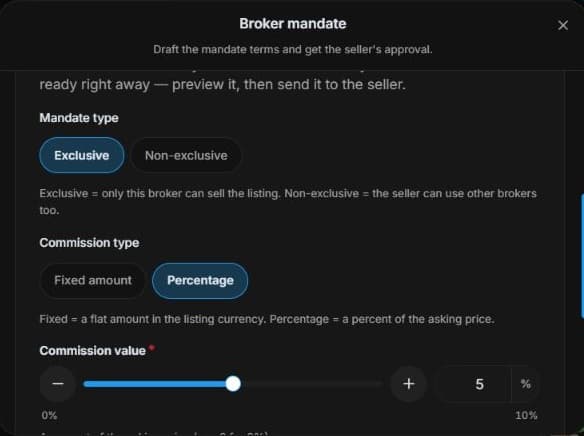
2. Inspect the agreed commission basis
Inspect Owners → Mandate terms → Commission type/value and duration. Reconcile calculation basis and currency. Draft changes do not amend signed terms or establish payment.
3. Separate pipeline progress and earned fees
Filter Deal Room by status/stage. Written continuation: inspect the commission-report option for an eligible closed-won deal and reconcile mandate terms. Progress is not probability, forecast or payment.
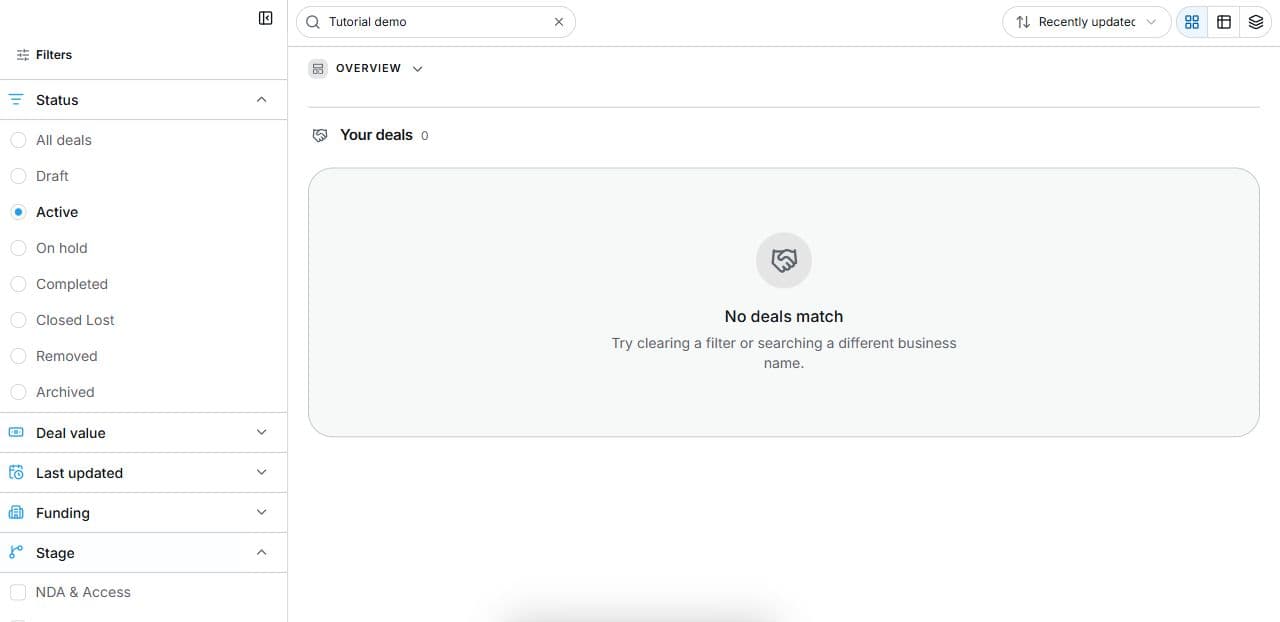
4. Review the outcome and next step
For a real closed deal, reconcile the report with final mandate terms and settlement evidence. Keep expected, earned and received amounts distinct. Check what a pipeline metric measures before reporting it. The tutorial changes no commission, contract, closed status or payment record; it also makes no claim that funds have arrived.
Common questions
Short answers to what people ask most about this part of the product.
Is progress a commission forecast?
No. It measures tasks. Mandate commission and eligible closed-won reports exist; progress is not probability, forecast income or payment.
What should a closed-won commission report be compared with?
Reconcile it with final mandate terms, calculation basis, currency and actual settlement evidence. A report is not proof of payment or a forecast for active deals.
Why are the shown controls in English?
These real platform captures use English labels. Italian narration and instructions retain them so you can identify the exact shown controls.
Video transcript
You need to reconcile brokerage terms with pipeline work without mistaking progress for income. Start at mandate commission type, value and duration. The practical task is confirming the agreed calculation basis. In mandate terms, inspect commission type, value and duration. Compare fixed or percentage terms with the actual engagement, including the calculation basis and currency. A draft field does not amend a signed contract. Revised terms need the appropriate review and agreement. Commission values describe the mandate; they do not prove payment or predict that an active transaction will complete. Use Deal Room filters for active stages and completed deals. Task progress measures work, not closing probability or forecast income. For an eligible closed-won deal, inspect the available commission-report document workflow and reconcile it with the mandate. The report needs review; it is not payment confirmation or proof that funds arrived. For a real closed deal, reconcile the report with final mandate terms and settlement evidence. Keep expected, earned and received amounts distinct. Check what a pipeline metric measures before reporting it.
Watch the video, or follow the written steps below. Both cover the same walkthrough.